Getting Started
with ITISeasy.team
Login & Registration
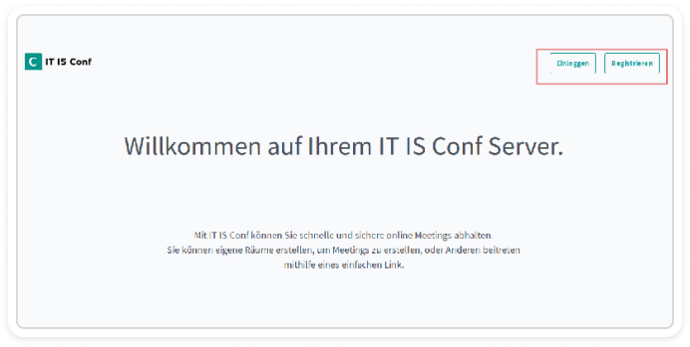
Visit the ITISeasy.team homepage to access your video conferencing dashboard.
Already have an account? Click Login to get started.
New user? Click Register to create your profile.
Each conference room can be configured individually - from who can join to what permissions participants get.
Getting Started
with ITISeasy.team
Login & Registration
Visit the
ITISeasy.team homepage
to access your video conferencing dashboard.
Already have an account? Click
Login
to get started.
New user? Click
Register
to
create your profile.
Each conference room can be configured individually - from who can join to what permissions participants get.
Creating a New Account
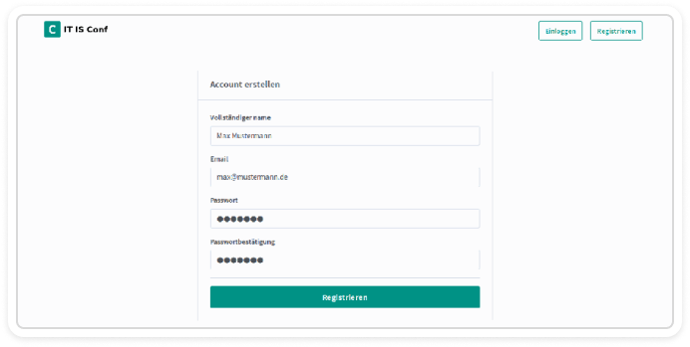
Simple Registration Process
Click Register
Fill in your:
Name
Email address
Password
Click the Register button to submit your request
Security-first: The user remains inactive until an administrator approves the account. This ensures only authorized participants gain access.
Creating a New Account
Simple Registration Process
Click Register
Fill in your:
Name
Email address
Password
Click the Register button to submit your request
Security-first: The user remains inactive until an administrator approves the account. This ensures only authorized participants gain access.
Managing Participants (Admin View)
Organization Panel
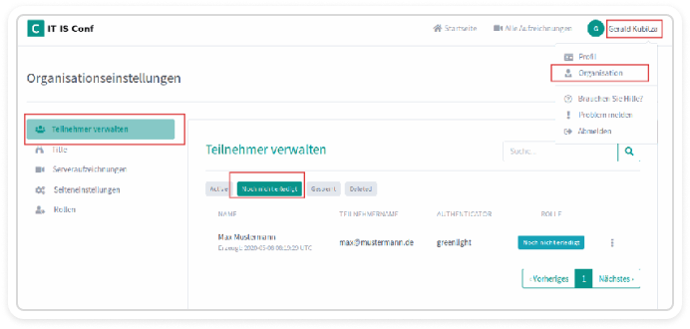
If you’re an administrator, click your username in the top-right corner and select Organization.
From here, you can:
View all participants
See pending user registrations
Manage active/inactive accounts
Under the “Not Yet Done” tab, you’ll find all user requests awaiting confirmation.
Managing Participants (Admin View)
Organization Panel
If you’re an administrator, click your username in the top-right corner and select Organization.
From here, you can:
View all participants
See pending user registrations
Manage active/inactive accounts
Under the “Not Yet Done” tab, you’ll find all user requests awaiting confirmation.
Approving or Rejecting Users
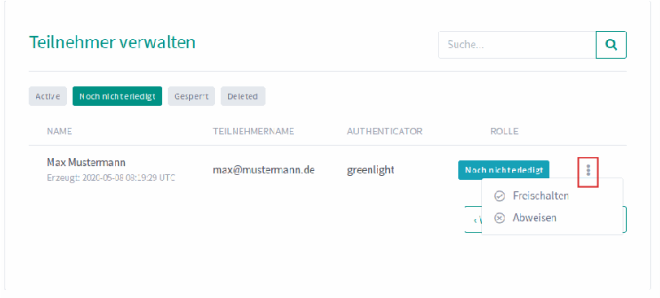
To manage new user access:
Click the three-dot menu next to a pending user
Select Approve or Reject based on the request
Once approved, the user becomes active and can participate in conferences
This gives you full control over who joins your video meetings and when.
Approving or Rejecting Users
To manage new user access:
Click the three-dot menu next to a pending user
Select Approve or Reject based on the request
Once approved, the user becomes active and can participate in conferences
This gives you full control over who joins your video meetings and when.
Assigning Roles for Better Control
Role-Based Access Management
For every user, you can assign roles such as:
Moderator
Presenter
Viewer
Roles define what each participant can do - from sharing screens to managing others.
You can assign, edit, or remove roles directly from the user profile settings. Easy and flexible!
Assigning Roles for
Better Control
Role-Based Access Management
For every user, you can assign roles such as:
Moderator
Presenter
Viewer
Roles define what each participant can do - from sharing screens to managing others.
You can assign, edit, or remove roles directly from the user profile settings. Easy and flexible!
Why ITISeasy.team?
Secure: Encrypted meetings with access control
Structured: Full control over registration and roles
Customizable: Configure permissions per conference room
Scalable: Perfect for small teams and large organizations alike
Whether you’re hosting internal strategy sessions or online client demos - ITISeasy.team gives you a smooth, professional experience.
Why ITISeasy.team?
Secure: Encrypted meetings with access control
Structured: Full control over registration and roles
Customizable: Configure permissions per conference room
Scalable: Perfect for small teams and large organizations alike
Whether you’re hosting internal strategy sessions or online client demos - ITISeasy.team gives you a smooth, professional experience.
Bundle ITISeasy.team with ITISeasy.suite
Looking for more than just video conferencing?
Combine with other tools in the ITISeasy.suite for all-in-one digital collaboration:
Bundle ITISeasy.team with ITISeasy.suite
Looking for more than just video conferencing?
Combine with other tools in the ITISeasy.suite for all-in-one digital collaboration:
ITISeasy.business
– ERP & CRM
ITISeasy.docs
– Document management
ITISeasy.business
– ERP & CRM
ITISeasy.docs
– Document management
ITISeasy.control-center
– Centralized system admin
ITISeasy.control-center
– Centralized system admin
Synergies that save time, reduce costs, and boost efficiency.
Explore ITISeasy.suite now
Synergies that save time, reduce costs, and boost efficiency.
Explore ITISeasy.suite now
Ready to Get Started?
Create Your Account
Configure Your Server Request a Demo
ITISeasy.team – Your secure solution for professional online meetings.
Manage participants. Assign roles. Conduct smarter meetings.
Ready to Get Started?
Create Your Account Configure Your Server Request a Demo
ITISeasy.team – Your secure solution for professional online meetings.
Manage participants. Assign roles. Conduct smarter meetings.